


用 Minecraft 还原接水管小游戏:基于 Prim 算法的随机树生成和基于 Tarjan 算法的环路搜索
1. 引言
接水管(Pipes,或称 Freenet)是一种益智类小游戏,其玩法是:在
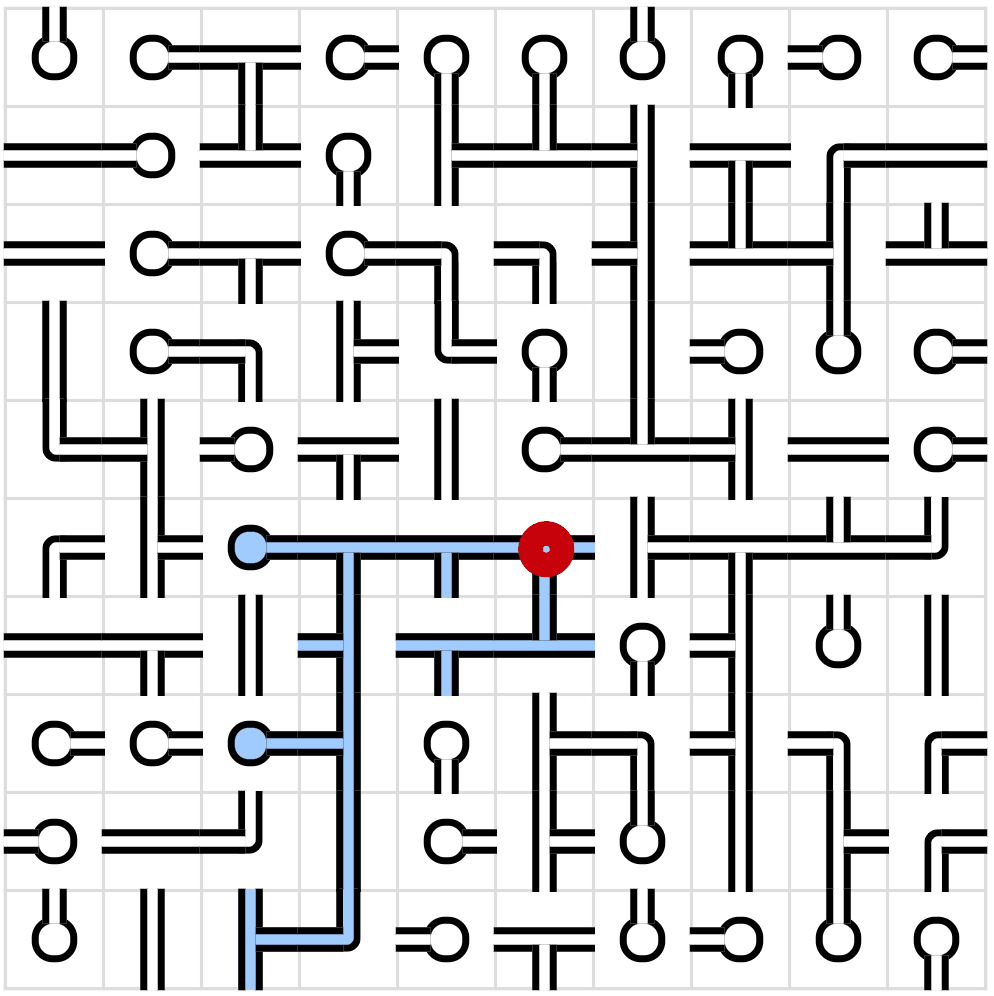
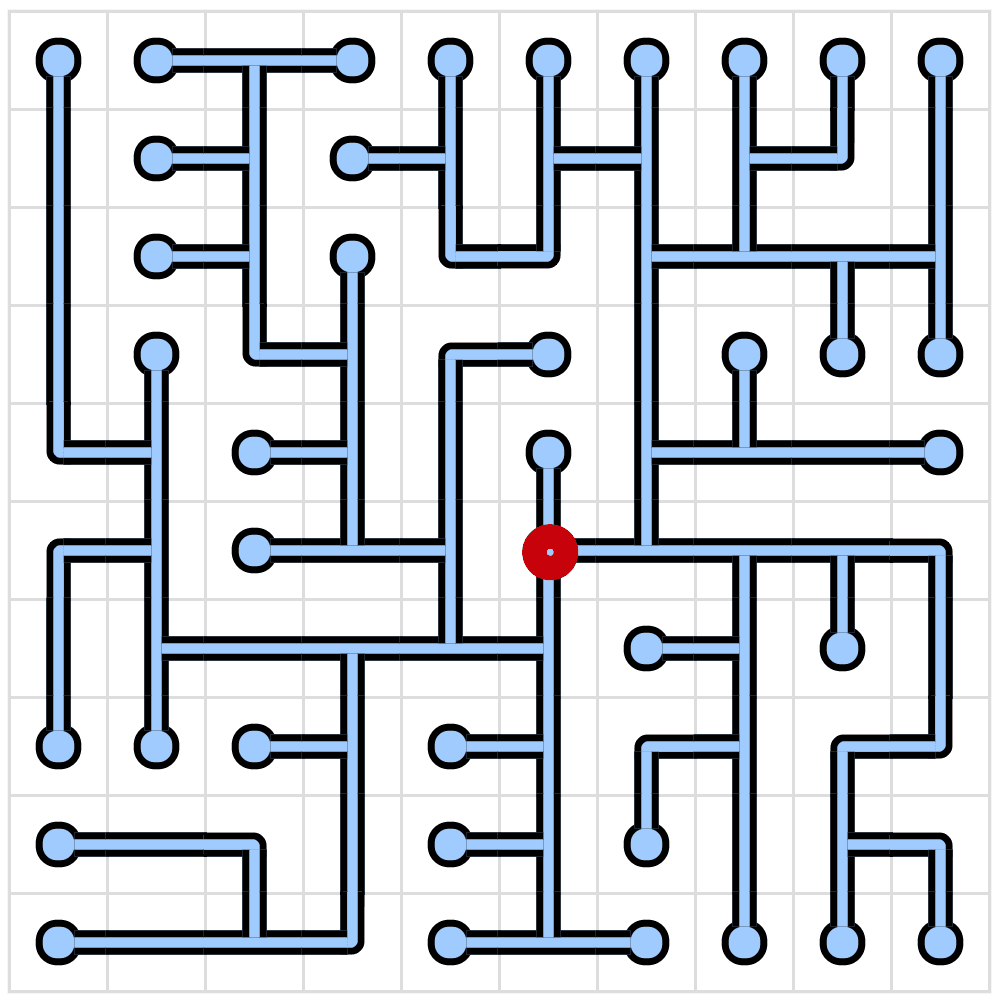
图 1:接水管小游戏实例,左图为题目,右图为答案
为了确保游戏一定是有解的,一般的做法是先生成地图,再随机打乱其中的管道。这些随机生成的地图实际上是树,每一个方格被视为节点,其中水源(即为图 1 中标注出来的红色圆圈的位置)是为树的根节点。它有如下的性质:
- 图中不存在环路。
- 图中仅存在一棵树,沿着树能到达网格上的所有位置。
- 树仅包含以下形状的管道,十字型的管道不被允许生成。
- 端点(死胡同),含有四个方向。
- 直管,有 ━、┃ 两个方向。
- L 型弯管,有 ┏、┓、┗、┛ 四种形状。
- T 型管,有 ┣、┳、┫、┻ 四种形状。
用于生成随机树的方法有很多种,包括但不限于深度优先算法、Prim 算法、Kruskal 算法、Wilson 算法等。这些算法各自有其特点,生成的图有不一样的偏好。比如深度优先算法更倾向于生成长直线路径,相对于其他算法而言产生的分支较少,这使得生成的地图比较死板,游戏难度也会相应降低。Kruskal 和 Wilson 算法更适合生成自然的、均匀的随机树。Kruskal 算法在初始化时会将每个方格视为一个独立的集合,每次随机连边时都要做复杂的并查集判断,看两个格子是否属于同一个集合。Wilson 算法采用的是回路消除随机游走,每次选择一个未生成图的位置,随机游走直到碰到已有的树,这个过程需要确认路径轨迹、将新生成的分支与已有的树产生连接。Prim 生成的图路径通常比较短且碎,错落有致,产生的谜题难度理论上较大。与 Wilson 算法“从未知向已知游走”的生成模式不同,Prim 算法是较为纯粹的向外生长的生成模式,理论上这种方式对 mcf 而言实现起来会略微简便一些。因此,本文采用 Prim 算法作为用 Minecraft 生成接水管谜题的初次探索。
不过,仅仅生成随机树对于接水管小游戏而言是远远不够的,还需要判断玩家是否完成接水管谜题。一种可能的办法是,直接对比游戏局面和最终解,如果它们是完全一致的,就说明玩家已经完成了谜题。但是这种方法仅适用于唯一解的情况。既有研究对 Prim 算法生成唯一解谜题的频率作了统计,当网格面积越大,Prim 算法的唯一解谜题大幅度下滑,在
由于最终解是树,因此可以从根节点出发,遍历树上的所有节点是否覆盖了整个网格。遍历树的方法也有很多,如广度优先搜索(以下简称 BFS)、深度优先搜索(以下简称 DFS)。比较关键的地方在于,玩家在尝试连接的过程中会不可避免地产生环路,而环路在树中被视为非法连接,如图 2 所示。BFS 和 DFS 都能够识别环路,程序从一个节点向前遍历时,若下一个节点已经被访问过了,它可以认为此处产生了环路,但不会知道环是从什么地方绕过来的。
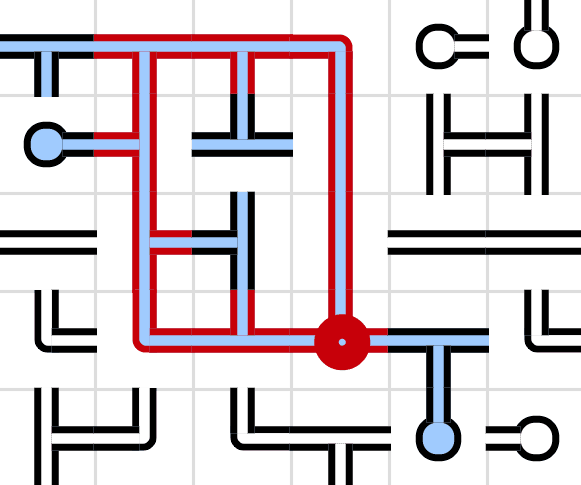
图 2:接水管小游戏官网标注了出现环路的地方
为了更好地还原这个小游戏,尤其是顺着图标记出位于环路上的所有节点,此时需要考虑此图为有向图还是无向图。这两者在节点数据的存储上会有所不同,有向图中每个节点需要记录的内容为:当前节点的位置、指向的邻居节点;无向图需要记录当前节点的位置和连接的邻居节点。这意味着有向图的生成过程中需要检查每一条边的方向,如果一条边是由邻居节点指向它的,那么这条边就不能算该节点指向的邻居节点,此处相比无向图而言多了一条判断语句。此外,在游戏过程中,有向图会很大程度地造成水流流向的混乱。
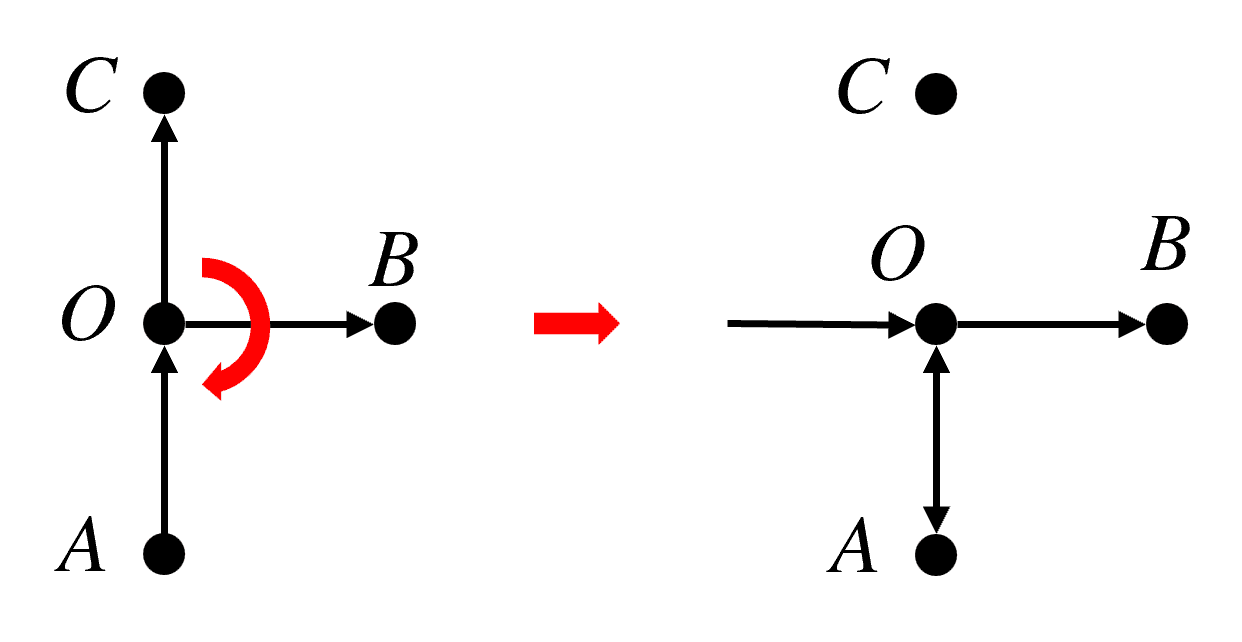
图 3:有向图在接水管旋转上的问题
如图 3,左侧显示的是一个正常的有向图。然而,当玩家尝试对 T 型管
在无向图中,如果进行 DFS,经过的边可分为树边和反向边,其中反向边是指向已经在 DFS 栈中的祖先节点的边。下图展示了两种形态的环路,其中左图的
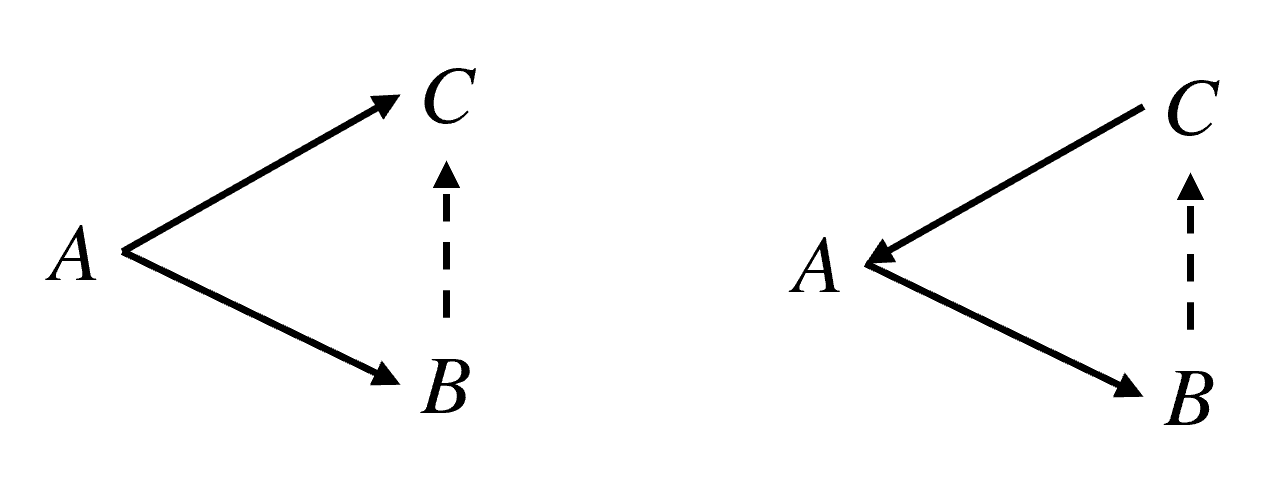
图 4:两种形态的环路
Tarjan 算法利用了这个性质,通过维护 dfn 和 low 两个数组,仅需一次 DFS 就能在回溯的过程中将所有的环路识别出来。本项目将使用 Tarjan 算法作为接水管谜题的解题判定方式。
2. 思路与流程
接下来需要确定具体的算法和思路。由于本文涉及的算法较为复杂,因此先用伪代码对这些算法做一个初步规划,从而方便后续的编写。本文涉及的算法主要包含两种:用于生成地图的随机 Prim 算法和用于判断解题的 DFS,其中为使 DFS 能够遍历环路,此算法另外添加了环路回溯。
2.1 随机 Prim 算法
Prim 算法是一种用于在加权连通图中构建最小生成树的算法。它从一个根节点开始,将节点的边纳入候选边列表,然后每一步选择候选边列表中权重最小的边,并将该边所连的未选节点加入树中。这个过程不断重复,直到所有节点都被纳入生成树,从而得到一棵包含全部节点且总权重最小的树。
在该条件下,如果令每一条边的权重相等,每次等可能地抽取任意的边,就变成了本文所使用的随机化 Prim 算法。完整的随机 Prim 算法所用的伪代码如下所示:
Prim 算法伪代码
t = t_source  // t:节点,t_source:根节点
visit t
for n ∈ N do
  push (t, t_n) to list  // t_n:t的邻居节点
end for
while list is not empty do
  x = random(1, size of list)
  (t_c, t_cn) = list[x]  // t_cn:t_c的邻居节点
  if t_cn unvisited & t_c not t_shape then
    connect(t_c, t_cn)
    visit t_cn
    for n ∈ N do
      if t_cnn unvisited then  // t_cnn:t_cn的邻居节点
        push (t_cn, t_cnn) to list
      end if
    end for
  end if
  erase t_c from list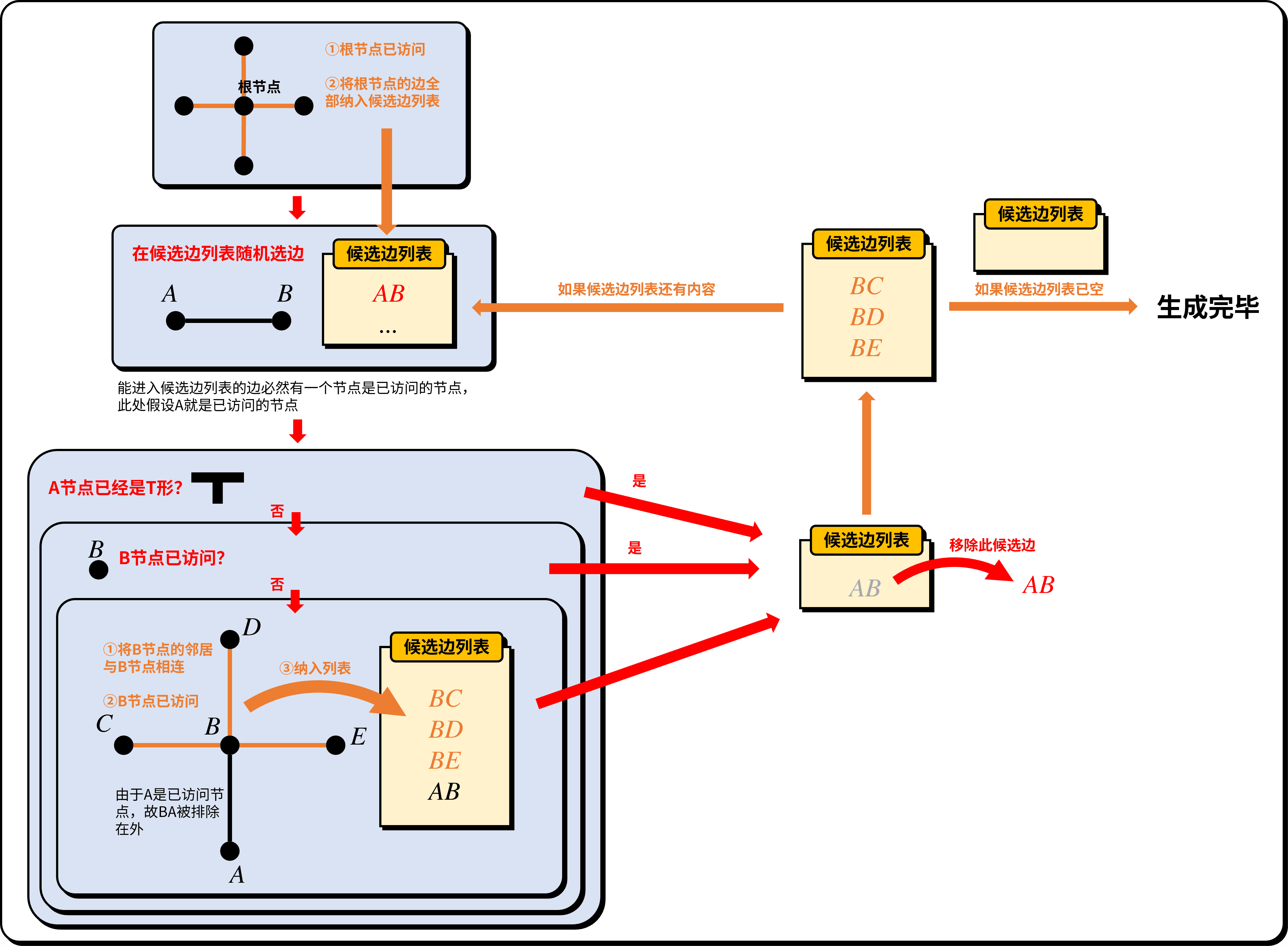
图 5:Prim 算法流程图
2.2 Tarjan 算法
要找环路,本质上就是要找割点。Tarjan 提出了一个极其经典的局部判定条件。对于 DFS 树中的一个父节点
其中 dfn 是节点的遍历计数。只要遇到未访问的节点,dfn 就会增加 1,所以它是一直递增的,记录了每个节点被遍历的先后顺序。low 是指:从节点 dfn 最小、也就是最早被遍历的节点的 dfn 值。
这个公式的意义是:子树
在向深处搜索时,将所有遍历的节点和边(邻居节点)依次入栈。由于 DFS 保证了搜索的连续性,当回溯到某个节点
Tarjan算法
class Tile:
  def __init__(self, x, y):
    self.dfn = 0
    self.low = 0
    self.pos = (x, y)
    self.side = bytearray([0, 0, 0, 0])
    self.state = "none"

def neighbours(current_tile: Tile):
  neighbour_tiles = []
  x, y = current_tile.pos
  directions = [
    (-1, 0, 0, 2),
    (0, -1, 1, 3),
    (1, 0, 2, 0),
    (0, 1, 3, 1)
  ]
  for dx, dy, current_side, neighbour_side in directions:
    if (x + dx, y + dy) in grid:
      neighbour_tile = grid[(x + dx, y + dy)]
      if current_tile.side[current_side] == 1 and neighbour_tile.side[neighbour_side] == 1:
        neighbour_tiles.append(neighbour_tile)
  return neighbour_tiles

stack = []
dfn_counter = 0
warn_tiles_count = 0

def dfs(current_tile: Tile, parent: Tile):
  global dfn_counter, stack, warn_tiles_count
  dfn_counter += 1
  current_tile.low = dfn_counter
  current_tile.dfn = dfn_counter
  current_tile.state = "flood"
  stack.append(current_tile)
  for neighbour_tile in neighbours(current_tile):
    if neighbour_tile == parent:
      continue
    if neighbour_tile.state == "none":
      dfs(neighbour_tile, current_tile)
      current_tile.low = min(current_tile.low, neighbour_tile.low)
      if neighbour_tile.low >= current_tile.dfn:
        pop_tiles = []
        while True:
          pop_tile = stack.pop()
          pop_tiles.append(pop_tile)
          if pop_tile == neighbour_tile:
            break
        pop_tiles.append(current_tile)
        if len(pop_tiles) >= 3:
          for t in pop_tiles:
            warn_tiles_count += 1
            t.state = "warn"
    elif neighbour_tile.state == "flood":
      current_tile.low = min(current_tile.low, neighbour_tile.dfn)
2.3 具体流程
整个游戏可分为生成、解题两大模块,其中生成的过程可分为以下几个阶段:
- 初始化盘面,根据所需的长宽绘制网格。
- 用随机化 Prim 算法生成地图。
- 随机打乱整个盘面。
- 对玩家显示盘面。
当玩家进行解题时,每旋转一次盘面上的任意水管,都要运行一次 Tarjan 算法,以随时检测玩家是否完成谜题,此程序执行完毕后,对玩家显示盘面。
3. 代码实现
具体的游戏流程已在 2.3 节有完整说明,参考第 2 章给出的伪代码,接下来就可以用 mcf 写出具体的代码。
3.1 网格
首先需要确定的是整个盘面的大小。本项目配置了一个记分项 [pipes.var],一局游戏的网格宽度由 #width 存储,高度由 #height 存储。网格的所有数据存放在命令存储 pipes:grid 内,使用一个二维列表 grid,其中一级列表存储网格宽度方向的数据,二级列表存储网格高度方向的数据。grid 内的数据按行列对应实际网格内的节点,网格左上角的节点为 grid[0][0],宽度方向的坐标 grid[<width-1>][<height-1>]。
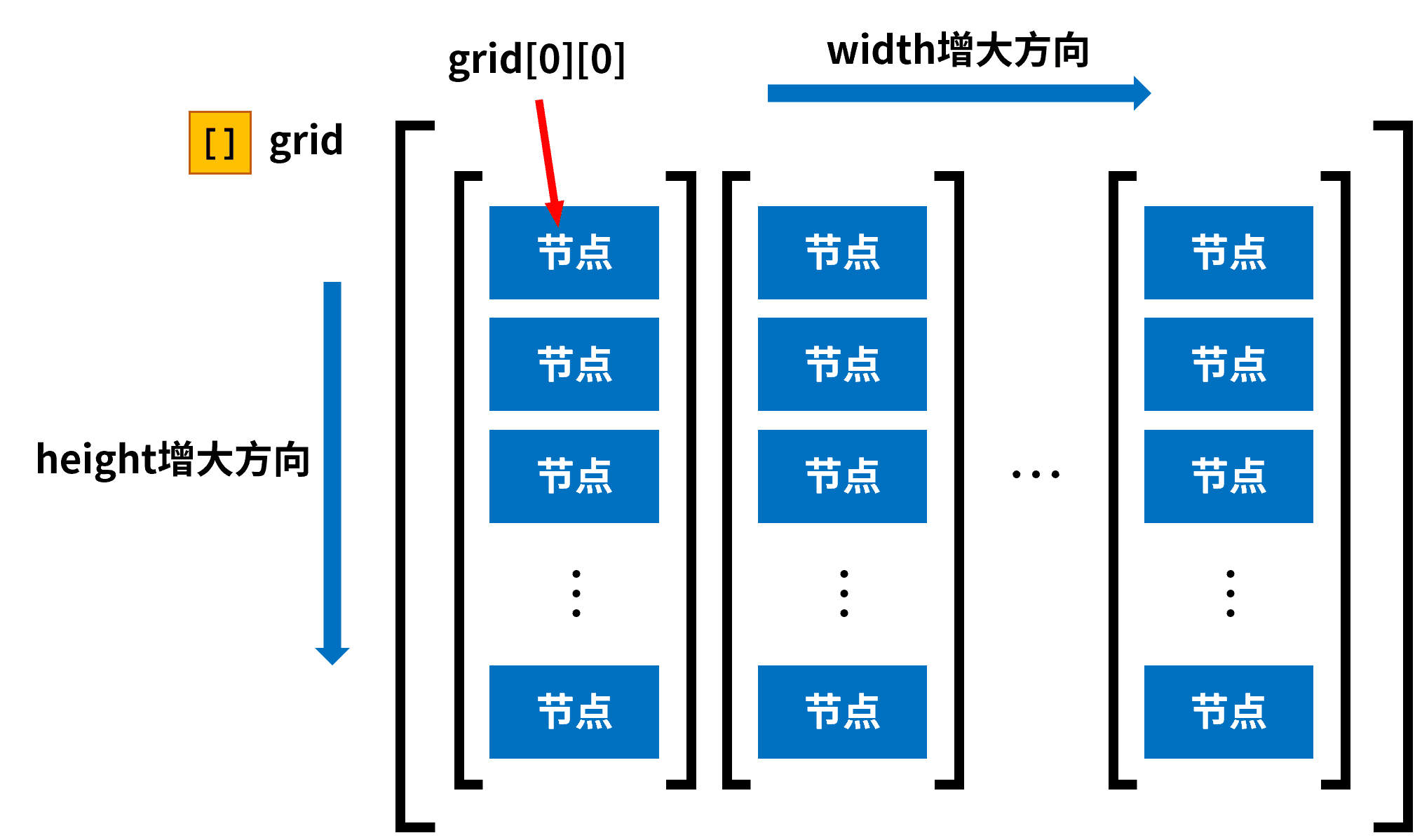
图 6:grid数据示意图
其中每一个 grid[x][y] 都有如下的数据:
 节点根标签
节点根标签 index:该节点的索引,从 1 开始计数,计算方式为
 <index>=<x>+<y>*<width>+1。- parent_x:该节点的父节点的
坐标。 - parent_y:该节点的父节点的
坐标。  side:该节点在四个方向上的连接情况,数组内一共有 4 个元素,依次代表左、上、右、下四个方向,其中
 0b为未连接,1b为连接。 source:该节点是否为根节点。
 state:该节点的状态,
0b为无,1b为灌水,2b为警告,3b为待访问。- visited:该节点在生成阶段是否已访问,在游戏阶段无实际作用。
- x:该节点的
坐标。 - y:该节点的
坐标。
接下来生成初始化的整个网格:
data\pipes\function\grid.mcfunction
data modify storage pipes:grid grid set value []
scoreboard players set #x pipes.var 0
function pipes:grid/width
scoreboard players reset #tile_index pipes.var
data\pipes\function\grid\width.mcfunction
scoreboard players set #y pipes.var 0
data modify storage pipes:grid grid append value []
function pipes:grid/height
scoreboard players add #x pipes.var 1
execute if score #x pipes.var < #width pipes.var run function pipes:grid/width
data\pipes\function\grid\height.mcfunction
data modify storage pipes:grid grid[-1] append value {side:[B;0b,0b,0b,0b],visited:false}
execute store result storage pipes:grid grid[-1][-1].x int 1.0 run scoreboard players get #x pipes.var
execute store result storage pipes:grid grid[-1][-1].y int 1.0 run scoreboard players get #y pipes.var
scoreboard players operation #tile_index pipes.var = #y pipes.var
scoreboard players operation #tile_index pipes.var *= #height pipes.var
scoreboard players operation #tile_index pipes.var += #x pipes.var
scoreboard players add #tile_index pipes.var 1
execute store result storage pipes:grid grid[-1][-1].index int 1.0 run scoreboard players get #tile_index pipes.var
scoreboard players add #y pipes.var 1
execute if score #y pipes.var < #height pipes.var run function pipes:grid/height
3.2 生成地图
用以下命令设置需要生成的网格的宽高:
scoreboard players set #width pipes.var <width>
scoreboard players set #height pipes.var <height>
然后可以执行以下函数:
data\pipes\function\prim\process.mcfunction
scoreboard players enable @s pipes.operation

#生成特定大小的方格
function pipes:grid/

#创建候选边列表
data modify storage pipes:prim alternative_side set value []

#确定起始生成的格子
scoreboard players operation #starting_tile_x pipes.var = #width pipes.var
scoreboard players operation #starting_tile_x pipes.var /= #2 pipes.constant
scoreboard players operation #starting_tile_y pipes.var = #height pipes.var
scoreboard players operation #starting_tile_y pipes.var /= #2 pipes.constant
data modify storage pipes:prim cache.current.tile set value [I;0,0]
execute store result storage pipes:prim cache.current.tile[0] int 1.0 run scoreboard players get #starting_tile_x pipes.var
execute store result storage pipes:prim cache.current.tile[1] int 1.0 run scoreboard players get #starting_tile_y pipes.var

#把当前的格子标记为已访问
execute store result storage pipes:prim macro.x int 1.0 run scoreboard players get #starting_tile_x pipes.var
execute store result storage pipes:prim macro.y int 1.0 run scoreboard players get #starting_tile_y pipes.var
function pipes:prim/visit_source with storage pipes:prim macro

#创建起始格子的候选边
data modify storage pipes:prim cache.current.side set value [B;-1b,0b]
data modify storage pipes:prim alternative_side append from storage pipes:prim cache.current
data modify storage pipes:prim cache.current.side set value [B;0b,-1b]
data modify storage pipes:prim alternative_side append from storage pipes:prim cache.current
data modify storage pipes:prim cache.current.side set value [B;1b,0b]
data modify storage pipes:prim alternative_side append from storage pipes:prim cache.current
data modify storage pipes:prim cache.current.side set value [B;0b,1b]
data modify storage pipes:prim alternative_side append from storage pipes:prim cache.current

#主函数:生成地图
function pipes:prim/main/

#打乱管道
function pipes:upset/

#显示生成结果
function pipes:operation/tarjan/
function pipes:display/

#删除候选边列表
data remove storage pipes:prim alternative_side
该函数实际上覆盖了整个随机 Prim 算法生成的过程。此处根节点被强制设置为位于整个
data\pipes\function\prim\visit_source.mcfunction
$data modify storage pipes:grid grid[$(x)][$(y)] merge value {source:true,state:3b,visited:true}3.2.1 候选边列表
存储 pipes:prim 是随机 Prim 算法的专用存储,候选边列表是其中的一个字段 alternative_side。由于它存储的实际上是边的数据而不是节点的数据,因此列表内元素的内容与节点数据有所区别。以下称候选边所属的节点为“当前节点”,候选边延伸方向的节点为“邻居节点”。每条候选边都有如下的数据:
候选边根标签- index:该候选边的方向,一共有 2 个元素。前一个元素为
-1b时,表示此边向左延伸;为1b时,此边向右延伸。后一个元素为-1b时,表示此边向上延伸;为1b时,此边向下延伸,实际上只有 4 种有效值:左[B;-1b,0b],上[B;0b,-1b],右[B;1b,0b],下[B;0b,1b]。  parent_x:当前节点的坐标,一共有 2 个元素,依次为
 、 坐标。
对于伪代码中的循环部分,则由以下函数完成:
data\pipes\function\prim\main.mcfunction
#从候选边列表抽取
execute store result storage pipes:prim macro.length_of_alternative_side int 1.0 run data get storage pipes:prim alternative_side
function pipes:prim/main/random with storage pipes:prim macro

#删除这一项
function pipes:prim/main/remove with storage pipes:prim macro

#递归
execute if data storage pipes:prim alternative_side[0] run function pipes:prim/main/
该函数用于从候选边列表抽取边:
data\pipes\function\prim\main\random.mcfunction
$execute store result score #random_in_alternative_side pipes.var run random value 1..$(length_of_alternative_side) pipes:prim
execute store result storage pipes:prim macro.random int 1.0 run scoreboard players remove #random_in_alternative_side pipes.var 1
function pipes:prim/main/check_connection_conditions with storage pipes:prim macro
data\pipes\function\prim\main\check_connection_conditions.mcfunction
$data modify storage pipes:prim cache.current set from storage pipes:prim alternative_side[$(random)]
execute store result score #current_x pipes.var run data get storage pipes:prim cache.current.tile[0]
execute store result score #current_y pipes.var run data get storage pipes:prim cache.current.tile[1]
execute store result score #neighbour_x pipes.var run data get storage pipes:prim cache.current.side[0]
execute store result score #neighbour_y pipes.var run data get storage pipes:prim cache.current.side[1]
scoreboard players operation #neighbour_x pipes.var += #current_x pipes.var
scoreboard players operation #neighbour_y pipes.var += #current_y pipes.var
execute store result storage pipes:prim macro.x int 1.0 run scoreboard players get #current_x pipes.var
execute store result storage pipes:prim macro.y int 1.0 run scoreboard players get #current_y pipes.var
execute store result storage pipes:prim macro.neighbour_x int 1.0 run scoreboard players get #neighbour_x pipes.var
execute store result storage pipes:prim macro.neighbour_y int 1.0 run scoreboard players get #neighbour_y pipes.var
function pipes:prim/main/get_current_and_neighbour with storage pipes:prim macro

#检查邻居节点是否未访问
execute if data storage pipes:prim cache.tile_check.neighbour{visited:true} run return fail

#检查本节点是否已是T形管
execute if data storage pipes:prim cache.tile_check.current{side:[B;1b,1b,1b,0b]} run return fail
execute if data storage pipes:prim cache.tile_check.current{side:[B;1b,1b,0b,1b]} run return fail
execute if data storage pipes:prim cache.tile_check.current{side:[B;1b,0b,1b,1b]} run return fail
execute if data storage pipes:prim cache.tile_check.current{side:[B;0b,1b,1b,1b]} run return fail

#如果上面的检查都通过了,就进行下面的内容
#连接邻居节点和当前节点
execute if data storage pipes:prim cache.current{side:[B;-1b,0b]} run function pipes:prim/main/connect/left with storage pipes:prim macro
execute if data storage pipes:prim cache.current{side:[B;0b,-1b]} run function pipes:prim/main/connect/up with storage pipes:prim macro
execute if data storage pipes:prim cache.current{side:[B;1b,0b]} run function pipes:prim/main/connect/right with storage pipes:prim macro
execute if data storage pipes:prim cache.current{side:[B;0b,1b]} run function pipes:prim/main/connect/down with storage pipes:prim macro

#将邻居节点标记为已访问
function pipes:prim/visit_neighbour with storage pipes:prim macro

#将邻居节点纳入候选边列表
scoreboard players operation #left_tile pipes.var = #neighbour_x pipes.var
scoreboard players remove #left_tile pipes.var 1
execute store result storage pipes:prim macro.left int 1.0 run scoreboard players get #left_tile pipes.var
scoreboard players operation #up_tile pipes.var = #neighbour_y pipes.var
scoreboard players remove #up_tile pipes.var 1
execute store result storage pipes:prim macro.up int 1.0 run scoreboard players get #up_tile pipes.var
scoreboard players operation #right_tile pipes.var = #neighbour_x pipes.var
scoreboard players add #right_tile pipes.var 1
execute store result storage pipes:prim macro.right int 1.0 run scoreboard players get #right_tile pipes.var
scoreboard players operation #down_tile pipes.var = #neighbour_y pipes.var
scoreboard players add #down_tile pipes.var 1
execute store result storage pipes:prim macro.down int 1.0 run scoreboard players get #down_tile pipes.var
function pipes:prim/main/neighbour_alternative_tiles with storage pipes:prim macro
data\pipes\function\prim\main\get_current_and_neighbour.mcfunction
$data modify storage pipes:prim cache.tile_check.current set from storage pipes:grid grid[$(x)][$(y)]
$data modify storage pipes:prim cache.tile_check.neighbour set from storage pipes:grid grid[$(neighbour_x)][$(neighbour_y)]
3.2.2 对邻居节点的处理
当邻居节点未访问且当前节点不是 T 形管时,需要连接邻居节点和当前节点,以左侧为例:
data\pipes\function\prim\main\connect\left.mcfunction
$data modify storage pipes:grid grid[$(x)][$(y)].side[0] set value 1b
$data modify storage pipes:grid grid[$(neighbour_x)][$(neighbour_y)].side[2] set value 1b
这实际上就是把当前节点 side 的第 0 个元素(代表左)设为 1b,把邻居节点 side 的第 2 个元素(代表右)设为 1b。其他方向的情况以此类推。
随后将邻居节点标记为已访问:
pipes-minigame\data\pipes\function\prim\visit_neighbour.mcfunction
$data modify storage pipes:grid grid[$(neighbour_x)][$(neighbour_y)].visited set value true最后一步是将将邻居节点的所有可用边纳入候选边列表:
data\pipes\function\prim\main\neighbour_alternative_tiles.mcfunction
data modify storage pipes:prim cache.neighbour.tile set value [I;0,0]
data modify storage pipes:prim cache.neighbour.tile[0] set from storage pipes:prim macro.neighbour_x
data modify storage pipes:prim cache.neighbour.tile[1] set from storage pipes:prim macro.neighbour_y
#左
$execute store result score #visited pipes.var run data get storage pipes:grid grid[$(left)][$(neighbour_y)].visited
execute unless score #left_tile pipes.var matches ..-1 unless score #visited pipes.var matches 1 run function pipes:prim/main/neighbour/left
scoreboard players reset #visited pipes.var
#上
$execute store result score #visited pipes.var run data get storage pipes:grid grid[$(neighbour_x)][$(up)].visited
execute unless score #up_tile pipes.var matches ..-1 unless score #visited pipes.var matches 1 run function pipes:prim/main/neighbour/up
scoreboard players reset #visited pipes.var
#右
$execute store result score #visited pipes.var run data get storage pipes:grid grid[$(right)][$(neighbour_y)].visited
execute unless score #right_tile pipes.var >= #width pipes.var unless score #visited pipes.var matches 1 run function pipes:prim/main/neighbour/right
scoreboard players reset #visited pipes.var
#下
$execute store result score #visited pipes.var run data get storage pipes:grid grid[$(neighbour_x)][$(down)].visited
execute unless score #down_tile pipes.var >= #height pipes.var unless score #visited pipes.var matches 1 run function pipes:prim/main/neighbour/down
scoreboard players reset #visited pipes.var
依然以邻居节点的左侧为例,其他方向以此类推:
data\pipes\function\prim\main\neighbour\left.mcfunction
data modify storage pipes:prim cache.neighbour.side set value [B;-1b,0b]
data modify storage pipes:prim alternative_side append from storage pipes:prim cache.neighbour
3.2.3 删除候选边
对一个候选边操作完成后,需要从候选边列表删去这个候选边,因为它已经处理完毕,与它有关的这一部分图已经确定。
data\pipes\function\prim\main\remove.mcfunction
$data remove storage pipes:prim alternative_side[$(random)]
execute store result score #test pipes.var run data get storage pipes:prim alternative_side
3.3 打乱管道
执行完整的随机 Prim 算法程序之后,开发者得到了一个完美的树。但 grid 存储的还是树形态的数据,并不具备一个接水管谜题的特征。所以接下来需要打乱其中的管道。此处需要遍历完整的网格,随机旋转每一个节点:
data\pipes\function\upset.mcfunction
data modify storage pipes:grid cache.processing_data set from storage pipes:grid grid
data modify storage pipes:grid cache.processing_data_cache set value []
function pipes:upset/width
data modify storage pipes:grid grid set from storage pipes:grid cache.processing_data_cache
data remove storage pipes:grid cache.processing_data
data remove storage pipes:grid cache.processing_data_cache
data\pipes\function\upset\width.mcfunction
data modify storage pipes:grid cache.processing_data_cache append value []
function pipes:upset/height
data remove storage pipes:grid cache.processing_data[0]
execute if data storage pipes:grid cache.processing_data[0] run function pipes:upset/width
data\pipes\function\upset\height.mcfunction
data modify storage pipes:grid cache.upset set from storage pipes:grid cache.processing_data[0][0]
function pipes:upset/random
data modify storage pipes:grid cache.processing_data_cache[-1] append from storage pipes:grid cache.upset
data remove storage pipes:grid cache.processing_data[0][0]
execute if data storage pipes:grid cache.processing_data[0][0] run function pipes:upset/height
data\pipes\function\upset\random.mcfunction
execute store result score #upset pipes.var run random value 1..4 pipes:prim
execute if score #upset pipes.var matches 1 run return run function pipes:upset/1
execute if score #upset pipes.var matches 2 run return run function pipes:upset/2
execute if score #upset pipes.var matches 3 run function pipes:upset/3
该函数用于随机旋转单个节点,规定随机值为 1 时顺时针旋转 1 次,为 2 时顺时针旋转 2 次,为 3 时顺时针旋转 3 次,为 4 时不发生旋转。节点的 side 是一个含有 4 个元素的数组,将数组的最后一个元素挪到第 0 位,即原先下侧的连接信息被移动到左侧,其他方向依次发生变化,是为完成了一次顺时针旋转。
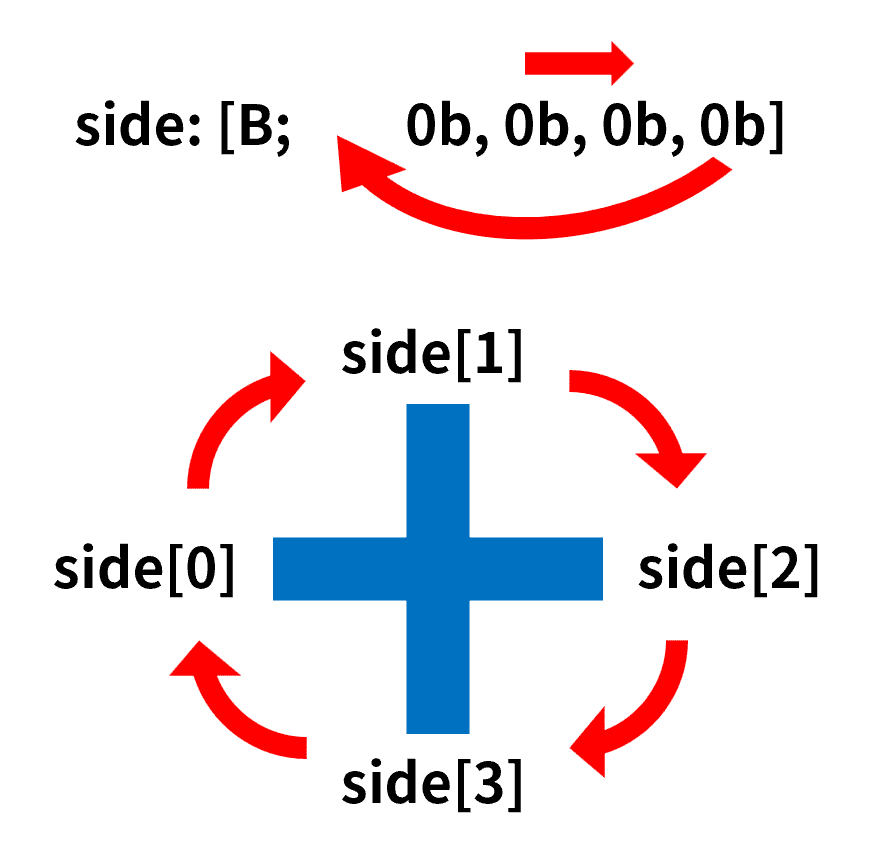
图 7:节点的旋转
因此旋转 1 次所用的函数为
data\pipes\function\upset\1.mcfunction
data modify storage pipes:grid cache.upset.side prepend from storage pipes:grid cache.upset.side[-1]
data remove storage pipes:grid cache.upset.side[-1]
旋转多次可以在函数内重复执行这两条命令。
3.4 游戏过程
玩家的操作需要被监听。pipes.operation 是一个触发器类型的记分项,当玩家旋转任意的节点时,将玩家在该记分项上的分数设为对应节点的 index,从而识别玩家旋转的是哪一个节点,具体的实现方式见第 4 章。监听操作使用的进度如下所示:
data\pipes\advancement\operation.json
{
  "criteria": {
    "rotate": {
      "conditions": {
        "player": [
          {
            "condition": "minecraft:any_of",
            "terms": [
              {
                "condition": "minecraft:entity_scores",
                "entity": "this",
                "scores": {
                  "pipes.operation": {
                    "min": 1
                  }
                }
              },
              {
                "condition": "minecraft:entity_scores",
                "entity": "this",
                "scores": {
                  "pipes.operation": -1
                }
              }
            ]
          }
        ]
      },
      "trigger": "minecraft:tick"
    }
  },
  "rewards": {
    "function": "pipes:operation/trigger/"
  }
}
data\pipes\function\operation\trigger.mcfunction
#旋转管道
advancement revoke @s only pipes:operation
execute store result storage pipes:grid macro.tile_index int 1.0 run scoreboard players get @s pipes.operation
function pipes:operation/trigger/tile with storage pipes:grid macro
scoreboard players reset @s pipes.operation
scoreboard players enable @s pipes.operation

#解题判定
function pipes:operation/tarjan/

#显示操作后的图
function pipes:display/

#音效
playsound item.book.page_turn player @s
以下函数用于旋转节点:
data\pipes\function\operation\trigger\tile.mcfunction
$data modify storage pipes:grid cache.processing_tile set from storage pipes:grid grid[][{index:$(tile_index)}]
data modify storage pipes:grid cache.processing_tile.side prepend from storage pipes:grid cache.processing_tile.side[-1]
data remove storage pipes:grid cache.processing_tile.side[-1]
$data modify storage pipes:grid grid[][{index:$(tile_index)}] set from storage pipes:grid cache.processing_tile
data remove storage pipes:grid cache.display
注意,玩家的每一次操作后都需要运行一次解题判断。根据 2.2 节的 Python 代码,这个部分的函数如下所示:
data\pipes\function\operation\tarjan.mcfunction
#重置计数器
scoreboard players reset #flood_tiles_count pipes.var

#重置状态
function pipes:operation/reset/
data modify storage pipes:grid stack set value []
data modify storage pipes:grid DFS set value []
scoreboard players set #dfn_counter pipes.var 0
scoreboard players set #warn_tiles_count pipes.var 0

#进入深度优先搜索
data modify storage pipes:grid DFS append value {}
data modify storage pipes:grid DFS[-1].current_tile set from storage pipes:grid grid[][{source:true}]
execute store result score #max_x pipes.var run data get storage pipes:grid grid
execute store result score #max_y pipes.var run data get storage pipes:grid grid[0]
scoreboard players remove #max_x pipes.var 1
scoreboard players remove #max_y pipes.var 1
scoreboard players reset #parent_x pipes.var
scoreboard players reset #parent_y pipes.var
function pipes:operation/tarjan/dfs/
data remove storage pipes:grid stack
data remove storage pipes:grid DFS

#判断是否全部灌水
scoreboard players operation #total pipes.var = #width pipes.var
scoreboard players operation #total pipes.var *= #height pipes.var
scoreboard players operation #flood_tiles_count pipes.var = #dfn_counter pipes.var
scoreboard players operation #flood_tiles_count pipes.var -= #warn_tiles_count pipes.var
execute unless score #total pipes.var = #flood_tiles_count pipes.var run return run tag @s remove pipes.win
tag @s add pipes.win
3.4.1 重置状态
每次解题判断都需要清除上一次判断遗留在网格节点内的 state,否则会造成本次判断过程紊乱:
data\pipes\function\operation\reset.mcfunction
data modify storage pipes:grid cache.processing_data set from storage pipes:grid grid
function pipes:operation/reset/width
data modify storage pipes:grid grid set from storage pipes:grid cache.processing_data_cache
data remove storage pipes:grid cache.processing_data
data remove storage pipes:grid cache.processing_data_cache
data\pipes\function\operation\reset\width.mcfunction
data modify storage pipes:grid cache.processing_data_cache append value []
function pipes:operation/reset/height
data remove storage pipes:grid cache.processing_data[0]
execute if data storage pipes:grid cache.processing_data[0] run function pipes:operation/reset/width
data\pipes\function\operation\reset\height.mcfunction
data modify storage pipes:grid cache.processing_data_cache[-1] append from storage pipes:grid cache.processing_data[0][0]
data modify storage pipes:grid cache.processing_data_cache[-1][-1].state set value 0b
data remove storage pipes:grid cache.processing_data_cache[-1][-1].dfn
data remove storage pipes:grid cache.processing_data_cache[-1][-1].low
data remove storage pipes:grid cache.processing_data_cache[-1][-1].parent
data remove storage pipes:grid cache.processing_data[0][0]
execute if data storage pipes:grid cache.processing_data[0][0] run function pipes:operation/reset/height
3.4.2 Tarjan 主循环
以下是 Tarjan 算法需要递归运行的函数。由于 Minecraft 的记分板和命令存储都是全局变量,因此需要显式栈来配合递归的运行。
data\pipes\function\operation\tarjan\dfs.mcfunction
execute store result storage pipes:grid DFS[-1].current_tile.low int 1.0 store result storage pipes:grid DFS[-1].current_tile.dfn int 1.0 run scoreboard players add #dfn_counter pipes.var 1
data modify storage pipes:grid DFS[-1].current_tile.state set value 1b
function pipes:operation/tarjan/dfs/set_current with storage pipes:grid DFS[-1].current_tile
data modify storage pipes:grid stack append from storage pipes:grid DFS[-1].current_tile

#检查邻居
function pipes:operation/tarjan/dfs/neighbour/
execute if data storage pipes:grid DFS[-1].neighbour_tile[0] run function pipes:operation/tarjan/dfs/neighbours
data\pipes\function\operation\tarjan\dfs\set_current.mcfunction
$data modify storage pipes:grid grid[$(x)][$(y)] merge from storage pipes:grid DFS[-1].current_tile其中 DFS 是递归函数所需的显式栈,stack 是 Tarjan 算法所需的栈。此处还需注意,DFS 内存放的是 grid 内的实际数据在某一时刻的快照数据,当实际数据发生变动时,DFS 内的数据并不会随之变动。因此需要慎用栈内的快照数据,最好使用栈保存的地址,如 index、x、y,用地址访问实际数据。
3.4.3 建立邻居列表
这个部分即为 Python 代码中对应的 neighbours 函数,将其转换为如下所示的 mcf 函数:
data\pipes\function\operation\tarjan\dfs\neighbour.mcfunction
execute store result score #current_x pipes.var run data get storage pipes:grid DFS[-1].current_tile.x
execute store result score #current_y pipes.var run data get storage pipes:grid DFS[-1].current_tile.y

#左侧邻居
scoreboard players operation #neighbour_x pipes.var = #current_x pipes.var
scoreboard players remove #neighbour_x pipes.var 1
execute store result storage pipes:grid macro.neighbour_x int 1.0 run scoreboard players get #neighbour_x pipes.var
execute store result storage pipes:grid macro.neighbour_y int 1.0 run scoreboard players get #current_y pipes.var
execute if score #neighbour_x pipes.var matches 0.. run function pipes:operation/tarjan/dfs/neighbour/left with storage pipes:grid macro

#上侧邻居
scoreboard players operation #neighbour_y pipes.var = #current_y pipes.var
scoreboard players remove #neighbour_y pipes.var 1
execute store result storage pipes:grid macro.neighbour_x int 1.0 run scoreboard players get #current_x pipes.var
execute store result storage pipes:grid macro.neighbour_y int 1.0 run scoreboard players get #neighbour_y pipes.var
execute if score #neighbour_y pipes.var matches 0.. run function pipes:operation/tarjan/dfs/neighbour/up with storage pipes:grid macro

#右侧邻居
scoreboard players operation #neighbour_x pipes.var = #current_x pipes.var
scoreboard players add #neighbour_x pipes.var 1
execute store result storage pipes:grid macro.neighbour_x int 1.0 run scoreboard players get #neighbour_x pipes.var
execute store result storage pipes:grid macro.neighbour_y int 1.0 run scoreboard players get #current_y pipes.var
execute if score #neighbour_x pipes.var <= #max_x pipes.var run function pipes:operation/tarjan/dfs/neighbour/right with storage pipes:grid macro

#下侧邻居
scoreboard players operation #neighbour_y pipes.var = #current_y pipes.var
scoreboard players add #neighbour_y pipes.var 1
execute store result storage pipes:grid macro.neighbour_x int 1.0 run scoreboard players get #current_x pipes.var
execute store result storage pipes:grid macro.neighbour_y int 1.0 run scoreboard players get #neighbour_y pipes.var
execute if score #neighbour_y pipes.var <= #max_y pipes.var run function pipes:operation/tarjan/dfs/neighbour/down with storage pipes:grid macro
以左侧邻居为例:
data\pipes\function\operation\tarjan\dfs\neighbour\left.mcfunction
execute store result score #connect pipes.var run data get storage pipes:grid DFS[-1].current_tile.side[0]
execute unless score #connect pipes.var matches 1 run return fail
$execute store result score #connect pipes.var run data get storage pipes:grid grid[$(neighbour_x)][$(neighbour_y)].side[2]
execute unless score #connect pipes.var matches 1 run return fail

$data modify storage pipes:grid DFS[-1].neighbour_tile append from storage pipes:grid grid[$(neighbour_x)][$(neighbour_y)]
判断邻居节点是否与当前节点连接即是判断当前节点 side 的第 0 个元素和邻居节点 side 的第 2 个元素是否为 1b。其他方向的写法以此类推。
3.4.4 对邻居节点的遍历
在建立邻居节点列表后,遍历列表内的邻居节点:
data\pipes\function\operation\tarjan\dfs\neighbours.mcfunction
function pipes:operation/tarjan/dfs/check_neighbours
data remove storage pipes:grid DFS[-1].neighbour_tile[0]
execute if data storage pipes:grid DFS[-1].neighbour_tile[0] run function pipes:operation/tarjan/dfs/neighbours
data\pipes\function\operation\tarjan\dfs\check_neighbours.mcfunction
execute store result score #parent_tile_index pipes.var run data get storage pipes:grid DFS[-1].current_tile.parent
function pipes:operation/tarjan/dfs/get_neighbour with storage pipes:grid DFS[-1].neighbour_tile[0]
execute store result score #neighbour_tile_index pipes.var run data get storage pipes:grid DFS[-1].neighbour_tile[0].index

#邻居节点是否不是当前节点的父节点
execute if score #parent_tile_index pipes.var = #neighbour_tile_index pipes.var run return fail

#判断邻居节点的状态
#无
execute store result score #neighbour_tile_state pipes.var run data get storage pipes:grid DFS[-1].neighbour_tile[0].state
execute if score #neighbour_tile_state pipes.var matches 0 run function pipes:operation/tarjan/dfs/none/

#灌水
execute store result score #neighbour_tile_state pipes.var run data get storage pipes:grid DFS[-1].neighbour_tile[0].state
execute if score #neighbour_tile_state pipes.var matches 1 run function pipes:operation/tarjan/dfs/flood
data\pipes\function\operation\tarjan\dfs\get_neighbour.mcfunction
$data modify storage pipes:grid DFS[-1].neighbour_tile[0] set from storage pipes:grid grid[][{index:$(index)}]3.4.5 邻居节点的状态为未访问时执行的函数
当邻居节点的状态为未访问时,需要进行 DFS 递归,将邻居节点设为当前节点,从而深度优先地将树搜索下去。当子层递归结束返回该层(即子树全部遍历完毕返回该节点)时,更新当前节点的 low,并在
data\pipes\function\operation\tarjan\dfs\none.mcfunction
#DFS递归
function pipes:operation/tarjan/dfs/none/dfs with storage pipes:grid DFS[-1].neighbour_tile[0]

#当前节点和邻居节点的low取较小值
execute store result score #current_tile_low pipes.var run data get storage pipes:grid DFS[-1].current_tile.low
function pipes:operation/tarjan/dfs/none/get_neighbour_low with storage pipes:grid DFS[-1].neighbour_tile[0]
scoreboard players operation #current_tile_low pipes.var < #neighbour_tile_low pipes.var
execute store result storage pipes:grid DFS[-1].current_tile.low int 1.0 run scoreboard players get #current_tile_low pipes.var
function pipes:operation/tarjan/dfs/set_current with storage pipes:grid DFS[-1].current_tile

#如果邻居节点的low大于等于当前节点的dfn
execute store result score #current_tile_dfn pipes.var run data get storage pipes:grid DFS[-1].current_tile.dfn
execute if score #neighbour_tile_low pipes.var >= #current_tile_dfn pipes.var run function pipes:operation/tarjan/dfs/neighbour_low
data\pipes\function\operation\tarjan\dfs\none\dfs.mcfunction
execute store result score #current_tile_index pipes.var run data get storage pipes:grid DFS[-1].current_tile.index
data modify storage pipes:grid DFS append value {}
$data modify storage pipes:grid DFS[-1].current_tile set from storage pipes:grid grid[$(x)][$(y)]
execute store result storage pipes:grid DFS[-1].current_tile.parent int 1.0 run scoreboard players get #current_tile_index pipes.var
function pipes:operation/tarjan/dfs/
data remove storage pipes:grid DFS[-1]
data\pipes\function\operation\tarjan\dfs\none\get_neighbour_low.mcfunction
$execute store result score #neighbour_tile_low pipes.var run data get storage pipes:grid grid[][{index:$(index)}].lowdata\pipes\function\operation\tarjan\dfs\neighbour_low.mcfunction
data modify storage pipes:grid pop_tiles set value []
function pipes:operation/tarjan/dfs/none/pop_tiles
data modify storage pipes:grid pop_tiles append from storage pipes:grid DFS[-1].current_tile
scoreboard players reset #length_of_pop_tiles pipes.var
execute store result score #length_of_pop_tiles pipes.var run data get storage pipes:grid pop_tiles
execute if score #length_of_pop_tiles pipes.var matches 3.. run function pipes:operation/tarjan/dfs/none/warn/
data\pipes\function\operation\tarjan\dfs\none\pop_tiles.mcfunction
data modify storage pipes:grid pop_tiles append from storage pipes:grid stack[-1]
data remove storage pipes:grid stack[-1]
execute store result score #pop_tile_index pipes.var run data get storage pipes:grid pop_tiles[-1].index
execute store result score #neighbour_tile_index pipes.var run data get storage pipes:grid DFS[-1].neighbour_tile[0].index
execute unless score #pop_tile_index pipes.var = #neighbour_tile_index pipes.var run function pipes:operation/tarjan/dfs/none/pop_tiles
data\pipes\function\operation\tarjan\dfs\none\warn.mcfunction
scoreboard players add #warn_tiles_count pipes.var 1
function pipes:operation/tarjan/dfs/none/warn/macro with storage pipes:grid pop_tiles[-1]
data remove storage pipes:grid pop_tiles[-1]
execute if data storage pipes:grid pop_tiles[0] run function pipes:operation/tarjan/dfs/none/warn/
data\pipes\function\operation\tarjan\dfs\none\warn\macro.mcfunction
$data modify storage pipes:grid grid[$(x)][$(y)].state set value 2b3.4.6 邻居节点的状态为已灌水时执行的函数
当邻居节点的状态为已灌水时,需要更新当前节点的 low,使得
data\pipes\function\operation\tarjan\dfs\flood.mcfunction
execute store result score #current_tile_low pipes.var run data get storage pipes:grid DFS[-1].current_tile.low
execute store result score #neighbour_tile_dfn pipes.var run data get storage pipes:grid DFS[-1].neighbour_tile[0].dfn
scoreboard players operation #current_tile_low pipes.var < #neighbour_tile_dfn pipes.var
execute store result storage pipes:grid DFS[-1].current_tile.low int 1.0 run scoreboard players get #current_tile_low pipes.var
function pipes:operation/tarjan/dfs/set_current with storage pipes:grid DFS[-1].current_tile
4. 可视化
到目前为止,游戏核心的数据已经基本编写完毕,现在需要将这些数据可视化。目前,对话框已用于很多小游戏的制作,对对话框 UI 的研究也已经成熟,故本项目将使用对话框显示接水管小游戏。一般而言,UI 的制作可用对话框原生的按钮,也可在 body 中用带点击事件的字体拼接,本项目选择后者。
每一种水管都被赋予了一个码位,并显示为特定位图字体,由于位图字体右侧的透明部分会被剔除,为了使网格整体对齐,所有字符对应的位图都被设计为统一的
表 1:水管字符使用的字体,其命名空间均为 pipes
| 对应字符 | 普通水管 | 灌水的水管 | 产生警告的水管 | 水源 | |
|---|---|---|---|---|---|
| 字体 | - | tube | tube_flooded | tube_warning | tube_source |
| 端点(左) | a |  |  | - |  |
| 端点(上) | b |  |  | - |  |
| 端点(右) | c |  |  | - |  |
| 端点(下) | d |  |  | - |  |
| 直管 ━ | e |  |  |  |  |
| 直管 ┃ | f |  |  |  |  |
| L 型弯管 ┛ | g |  |  |  |  |
| L 型弯管 ┗ | h |  |  |  |  |
| L 型弯管 ┏ | i |  |  |  |  |
| L 型弯管 ┓ | j |  |  |  |  |
| T 型管 ┫ | k |  |  |  |  |
| T 型管 ┻ | l |  |  |  |  |
| T 型管 ┣ | m |  |  |  |  |
| T 型管 ┳ | n |  |  |  |  |
以字体 pipes:tube 为例,其配置文件大致如下所示:
assets\pipes\font\tube.json
{
  "providers": [
    {
      "type": "bitmap",
      "file": "pipes:font/none/source/1.png",
      "height": 19,
      "ascent": 13,
      "chars": [
        "a"
      ]
    },
    {
      "type": "bitmap",
      "file": "pipes:font/none/source/2.png",
      "height": 19,
      "ascent": 13,
      "chars": [
        "b"
      ]
    },
    {
      "type": "bitmap",
      "file": "pipes:font/none/source/3.png",
      "height": 19,
      "ascent": 13,
      "chars": [
        "c"
      ]
    },
    {
      "type": "bitmap",
      "file": "pipes:font/none/source/4.png",
      "height": 19,
      "ascent": 13,
      "chars": [
        "d"
      ]
    },
    {
      "type": "bitmap",
      "file": "pipes:font/none/straight/1.png",
      "height": 19,
      "ascent": 13,
      "chars": [
        "e"
      ]
    },
    {
      "type": "bitmap",
      "file": "pipes:font/none/straight/2.png",
      "height": 19,
      "ascent": 13,
      "chars": [
        "f"
      ]
    },
    {
      "type": "bitmap",
      "file": "pipes:font/none/turn/12.png",
      "height": 19,
      "ascent": 13,
      "chars": [
        "g"
      ]
    },
    {
      "type": "bitmap",
      "file": "pipes:font/none/turn/23.png",
      "height": 19,
      "ascent": 13,
      "chars": [
        "h"
      ]
    },
    {
      "type": "bitmap",
      "file": "pipes:font/none/turn/34.png",
      "height": 19,
      "ascent": 13,
      "chars": [
        "i"
      ]
    },
    {
      "type": "bitmap",
      "file": "pipes:font/none/turn/41.png",
      "height": 19,
      "ascent": 13,
      "chars": [
        "j"
      ]
    },
    {
      "type": "bitmap",
      "file": "pipes:font/none/trible/1.png",
      "height": 19,
      "ascent": 13,
      "chars": [
        "k"
      ]
    },
    {
      "type": "bitmap",
      "file": "pipes:font/none/trible/2.png",
      "height": 19,
      "ascent": 13,
      "chars": [
        "l"
      ]
    },
    {
      "type": "bitmap",
      "file": "pipes:font/none/trible/3.png",
      "height": 19,
      "ascent": 13,
      "chars": [
        "m"
      ]
    },
    {
      "type": "bitmap",
      "file": "pipes:font/none/trible/4.png",
      "height": 19,
      "ascent": 13,
      "chars": [
        "n"
      ]
    },
    {
      "type": "bitmap",
      "file": "pipes:font/empty.png",
      "height": 19,
      "ascent": 13,
      "chars": [
        "o"
      ]
    }
  ]
}
同一行的节点会按顺序从左到右依次排列,随后连续添加 2 个换行符,继续排列下一行的节点。行内相邻的字符被添加了宽度为 -2 的空格以保证网格整体呈现正方形。同时,每个字符都应该是一个可以点击的文本组件,以供玩家旋转具体的管道。每个点击事件都应配备相应节点的标识,以供监听系统识别玩家旋转的是哪一个节点,如:
data\pipes\function\display\trigger.mcfunction
$data modify storage pipes:grid cache.display.click_event.command set value "trigger pipes.operation set $(tile_index)"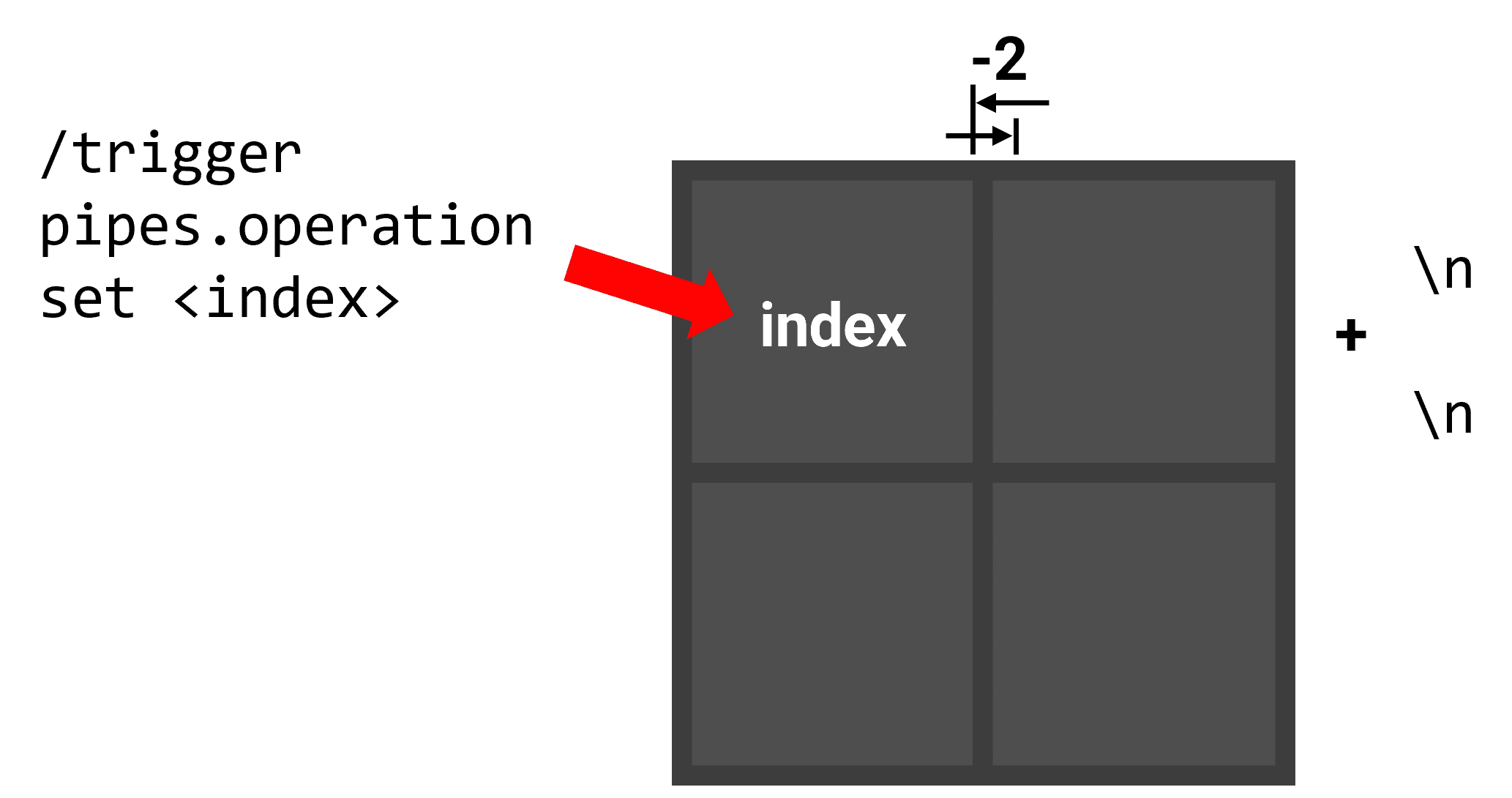
图 8:可视化排布方案
负空格字体使用如下的定义:
assets\pipes\font\tube_space.json
{
  "providers": [
    {
      "type": "space",
      "advances": {
        "%": -2
      }
    }
  ]
}
以下函数作为可视化的入口:
data\pipes\function\display.mcfunction(部分)
data remove storage pipes:grid display
data modify storage pipes:grid cache.processing_data set from storage pipes:grid grid
data modify storage pipes:grid display set value ["\n\n"]
data modify storage pipes:grid cache.processing_data_cache set value []
function pipes:display/height
function pipes:display/show with storage pipes:grid
data remove storage pipes:grid cache.processing_data
注意到,盘面数据所在的 grid 是一个二维列表,根据图 6,它的次级列表实际上存储的是一整列的节点而非一整行的节点,即所谓“列主序”。但是显示的部分显然需要“行主序”,因此只能遍历 grid,依次将其中每个列表的第 0 位元素提取出来,然后依次提取每个列表的第 1 位,以此类推。
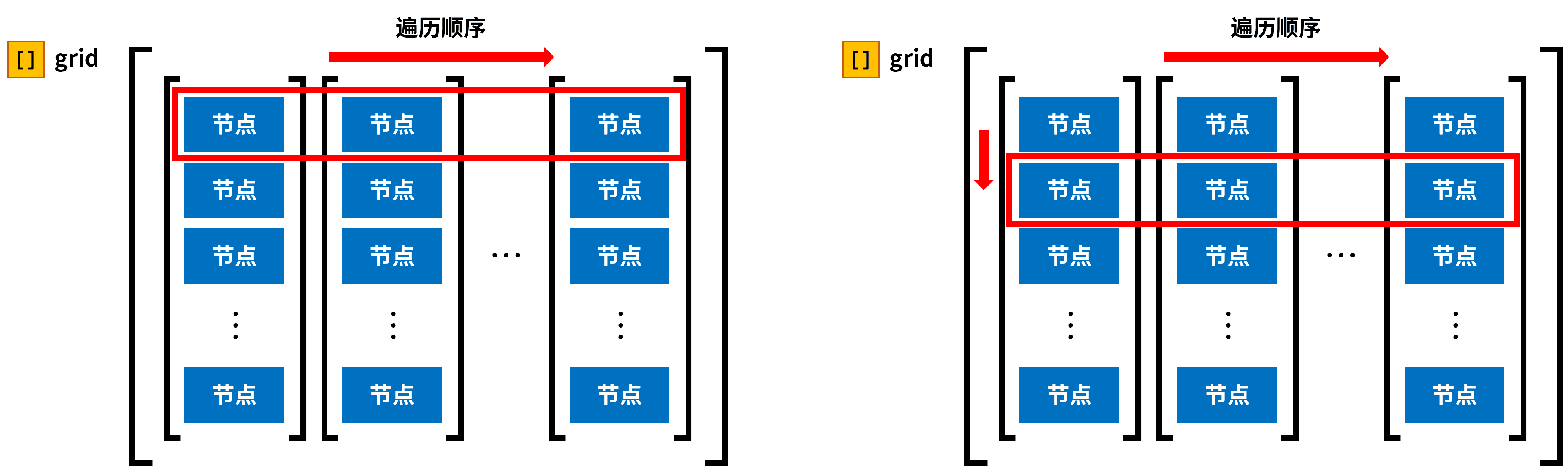
图 9:可视化过程的遍历顺序
这个过程使用以下的函数:
data\pipes\function\display\height.mcfunction
function pipes:display/width
data modify storage pipes:grid display append value "\n\n"
data modify storage pipes:grid cache.processing_data set from storage pipes:grid cache.processing_data_cache
data remove storage pipes:grid cache.processing_data_cache
execute if data storage pipes:grid cache.processing_data[0][0] run function pipes:display/height
data\pipes\function\display\width.mcfunction
data modify storage pipes:grid cache.processing_tile set from storage pipes:grid cache.processing_data[0][0]
function pipes:display/shapes
data modify storage pipes:grid macro.tile_index set from storage pipes:grid cache.processing_data[0][0].index
function pipes:display/trigger with storage pipes:grid macro
data modify storage pipes:grid display append from storage pipes:grid cache.display
execute if data storage pipes:grid cache.processing_tile{state:1b} run data modify storage pipes:grid display[-1].font set value "pipes:tube_flooded"
execute if data storage pipes:grid cache.processing_tile{state:2b} run data modify storage pipes:grid display[-1].font set value "pipes:tube_warning"
execute if data storage pipes:grid cache.processing_tile.source run data modify storage pipes:grid display[-1].font set value "pipes:tube_source"
data modify storage pipes:grid display append value {font:"pipes:tube_space",text:"%"}
data remove storage pipes:grid cache.processing_data[0][0]
data modify storage pipes:grid cache.processing_data_cache append from storage pipes:grid cache.processing_data[0]
data remove storage pipes:grid cache.processing_data[0]
execute if data storage pipes:grid cache.processing_data[0] run function pipes:display/width
data\pipes\function\display\shapes.mcfunction
execute if data storage pipes:grid cache.processing_tile{side:[B;1b,0b,0b,0b]} run return run data modify storage pipes:grid cache.display set value {click_event:{action:"run_command",command:"trigger pipes.operation set -1"},font:"pipes:tube",text:"a"}
execute if data storage pipes:grid cache.processing_tile{side:[B;0b,1b,0b,0b]} run return run data modify storage pipes:grid cache.display set value {click_event:{action:"run_command",command:"trigger pipes.operation set -1"},font:"pipes:tube",text:"b"}
execute if data storage pipes:grid cache.processing_tile{side:[B;0b,0b,1b,0b]} run return run data modify storage pipes:grid cache.display set value {click_event:{action:"run_command",command:"trigger pipes.operation set -1"},font:"pipes:tube",text:"c"}
execute if data storage pipes:grid cache.processing_tile{side:[B;0b,0b,0b,1b]} run return run data modify storage pipes:grid cache.display set value {click_event:{action:"run_command",command:"trigger pipes.operation set -1"},font:"pipes:tube",text:"d"}
execute if data storage pipes:grid cache.processing_tile{side:[B;1b,0b,1b,0b]} run return run data modify storage pipes:grid cache.display set value {click_event:{action:"run_command",command:"trigger pipes.operation set -1"},font:"pipes:tube",text:"e"}
execute if data storage pipes:grid cache.processing_tile{side:[B;0b,1b,0b,1b]} run return run data modify storage pipes:grid cache.display set value {click_event:{action:"run_command",command:"trigger pipes.operation set -1"},font:"pipes:tube",text:"f"}
execute if data storage pipes:grid cache.processing_tile{side:[B;1b,1b,0b,0b]} run return run data modify storage pipes:grid cache.display set value {click_event:{action:"run_command",command:"trigger pipes.operation set -1"},font:"pipes:tube",text:"g"}
execute if data storage pipes:grid cache.processing_tile{side:[B;0b,1b,1b,0b]} run return run data modify storage pipes:grid cache.display set value {click_event:{action:"run_command",command:"trigger pipes.operation set -1"},font:"pipes:tube",text:"h"}
execute if data storage pipes:grid cache.processing_tile{side:[B;0b,0b,1b,1b]} run return run data modify storage pipes:grid cache.display set value {click_event:{action:"run_command",command:"trigger pipes.operation set -1"},font:"pipes:tube",text:"i"}
execute if data storage pipes:grid cache.processing_tile{side:[B;1b,0b,0b,1b]} run return run data modify storage pipes:grid cache.display set value {click_event:{action:"run_command",command:"trigger pipes.operation set -1"},font:"pipes:tube",text:"j"}
execute if data storage pipes:grid cache.processing_tile{side:[B;1b,1b,0b,1b]} run return run data modify storage pipes:grid cache.display set value {click_event:{action:"run_command",command:"trigger pipes.operation set -1"},font:"pipes:tube",text:"k"}
execute if data storage pipes:grid cache.processing_tile{side:[B;1b,1b,1b,0b]} run return run data modify storage pipes:grid cache.display set value {click_event:{action:"run_command",command:"trigger pipes.operation set -1"},font:"pipes:tube",text:"l"}
execute if data storage pipes:grid cache.processing_tile{side:[B;0b,1b,1b,1b]} run return run data modify storage pipes:grid cache.display set value {click_event:{action:"run_command",command:"trigger pipes.operation set -1"},font:"pipes:tube",text:"m"}
execute if data storage pipes:grid cache.processing_tile{side:[B;1b,0b,1b,1b]} run return run data modify storage pipes:grid cache.display set value {click_event:{action:"run_command",command:"trigger pipes.operation set -1"},font:"pipes:tube",text:"n"}
data modify storage pipes:grid cache.display set value {font:"pipes:tube",text:"o"}
最后直接显示对话框:
data\pipes\function\display\show.mcfunction
$dialog show @s {after_action:"none",body:{contents:$(display),type:"minecraft:plain_message",width:500},pause:false,title:"",type:"notice"}显示的结果如下图所示。至此,接水管小游戏已制作完毕。
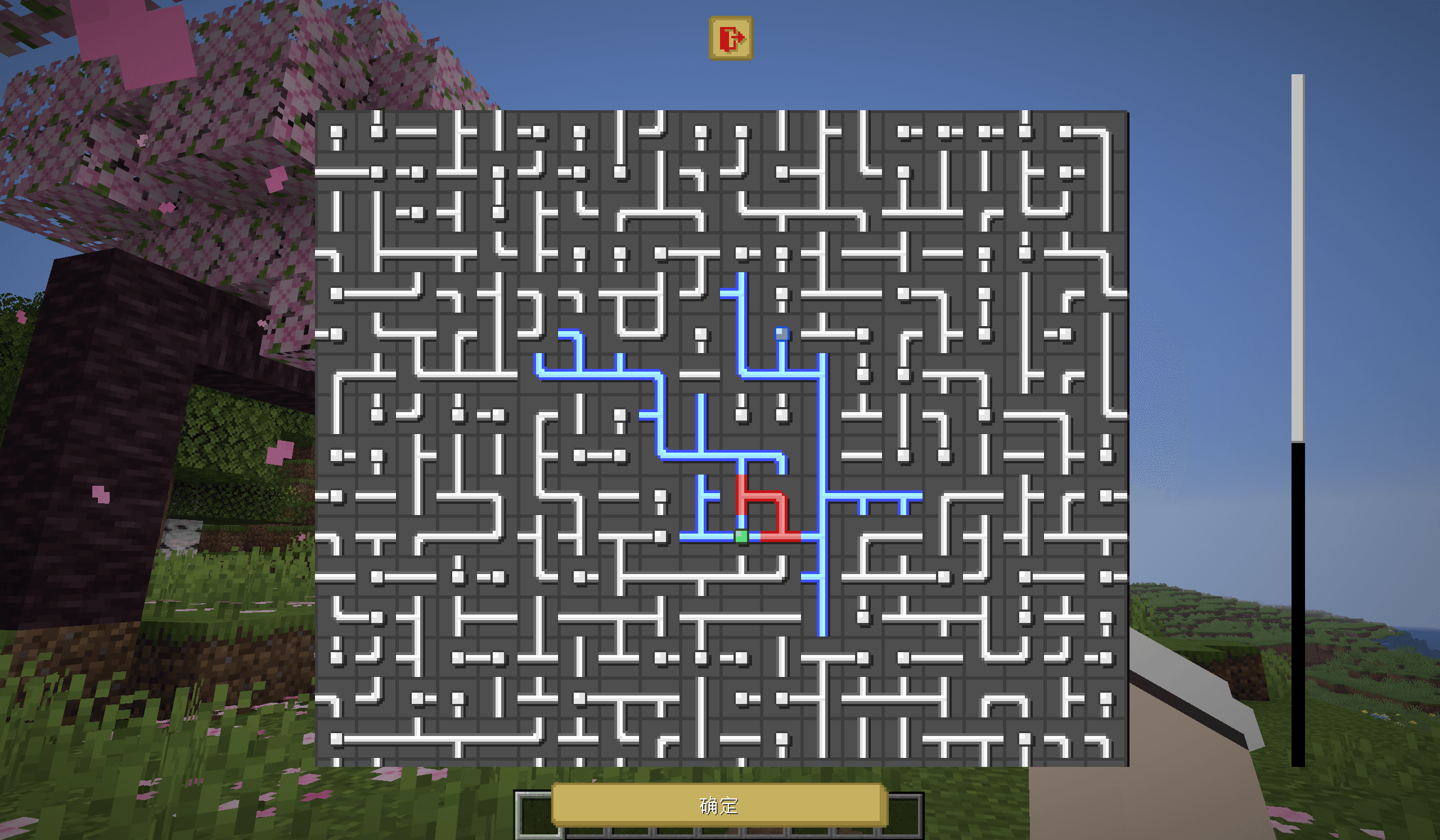
图 10:最终成果
5. 讨论
本项目基于完全的数据驱动,即只使用记分板和命令存储处理所有数据,因此在一些地方会不可避免地用到函数宏,这对于性能而言是不可小觑的影响。观察整个项目,可以发现绝大多数的函数宏都被用在了列表元素的索引,尤其是 grid 内节点的选定,而这又通常伴随整个列表甚至整个网格的遍历。对于
5.1 命令链长度
由于图是随机生成的,每次生成时分支数量、分支长短都不一致,因此完成一次生成以及进行一次解题判定所运行的命令链长度并不一致。例如,将游戏规则 max_command_sequence_length 设为 5000 时,尝试生成
在正常的游戏流程中,这种中途截断的现象显然是不可接受的。因此需要探讨在特定大小的网格下,max_command_sequence_length 到底设为多少才能保证 100% 的成功生成率。此处的生成接水管地图整个过程包括初始化网格、生成地图、打乱管道、初次尝试解题判定以及可视化这些操作。以 max_command_sequence_length 尝试生成 1000 次,得到的结果如下图所示:
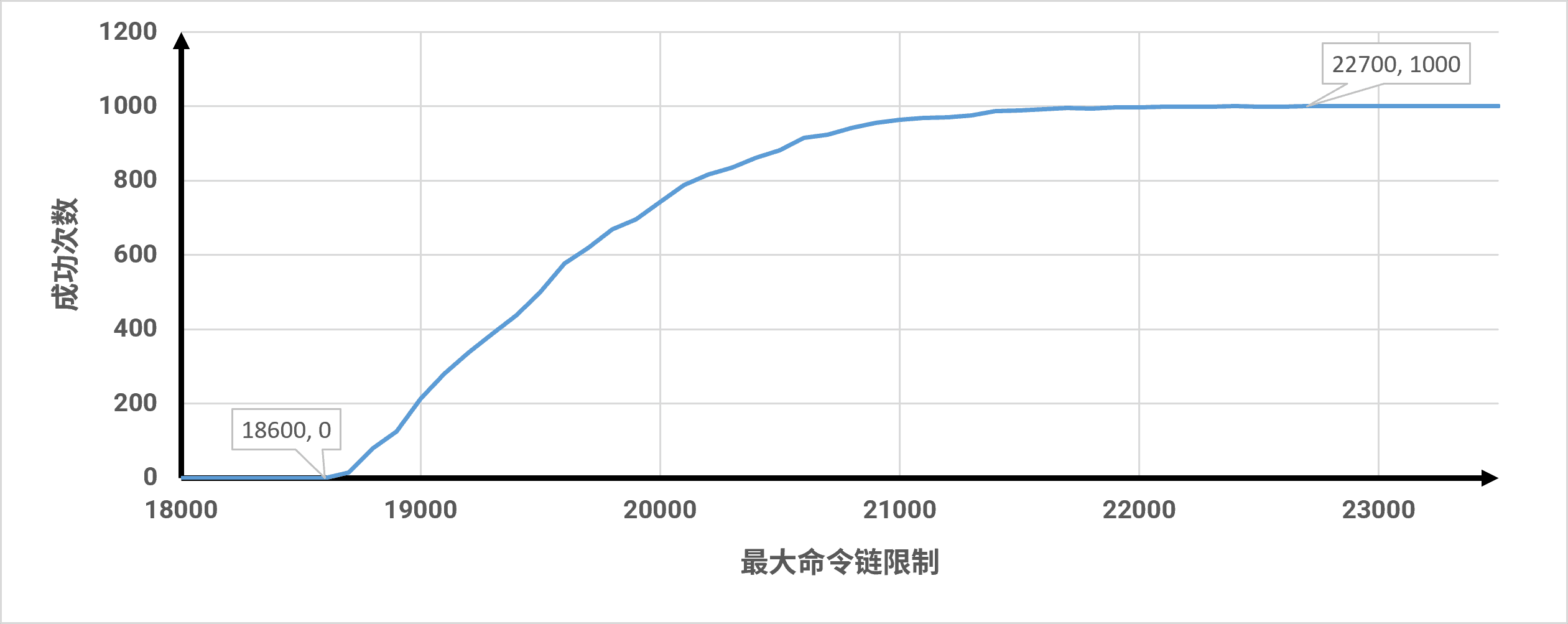
图 11:10x10 网格 1000 次尝试成功生成次数曲线图
数据表明,算法的计算开销并非呈现宽幅的无序毛刺分布,而是表现出极强的局部凝聚性与概率长尾性。在 18700 至 21000 的区间内,成功率发生了爆发式跃迁。而 21100 至 22600 出现了成功率停滞平台期,本质上是算法在防止十字型节点生成时高频触发空转剪枝所带来的概率长尾性。最终,算法在 22700 处实现了千次采样的绝对闭合收敛。由于概率长尾性的存在,特定大小网格成功生成图所需的命令链长度限制需要往上提升。本研究对不同边长(max_command_sequence_length 以千为步进长度,得到的结果如下表所示:
表 2:各网格尺度下算法命令链消耗的临界阈值统计表
| 网格边长( | 节点总数( | 绝对收敛阈值 |
|---|---|---|
| 4 | 16 | 5000 |
| 5 | 25 | 7000 |
| 6 | 36 | 10000 |
| 7 | 49 | 12000 |
| 8 | 64 | 15000 |
| 9 | 81 | 19000 |
| 10 | 100 | 23000 |
| 11 | 121 | 28000 |
| 12 | 144 | 32000 |
| 13 | 169 | 36000 |
| 14 | 196 | 42000 |
| 15 | 225 | 48000 |
| 16 | 256 | 55000 |
| 17 | 289 | 61000 |
| 18 | 324 | 67000 |
| 19 | 361 | 75000 |
| 20 | 400 | 82000 |
第 3 列的数据即为不同大小网格所需 max_command_sequence_length 的参考值,在实际运行游戏的过程中可随网格大小调整之。 根据第 3 列的数据,网格从
5.2 消耗时间
本研究还测试了不同尺寸网格生成接水管时所消耗的时间,所用设备 CPU 为 i7-14650HX,GPU 为 GeForce RTX 4060。研究仅测试了边长为 5、10、15、20 的正方形网格,每组测试 1000 次。测试使用 Minecraft 原生的秒表,仅作粗略测试使用,具体方法如下:
stopwatch restart pipes:debug
execute store result score #time1 pipes.var run stopwatch query pipes:debug 1000
#程序
execute store result score #time pipes.var run stopwatch query pipes:debug 1000
scoreboard players operation #time pipes.var -= #time1 pipes.var
测得的数据绘制成如下图所示的箱线图,单位为毫秒:
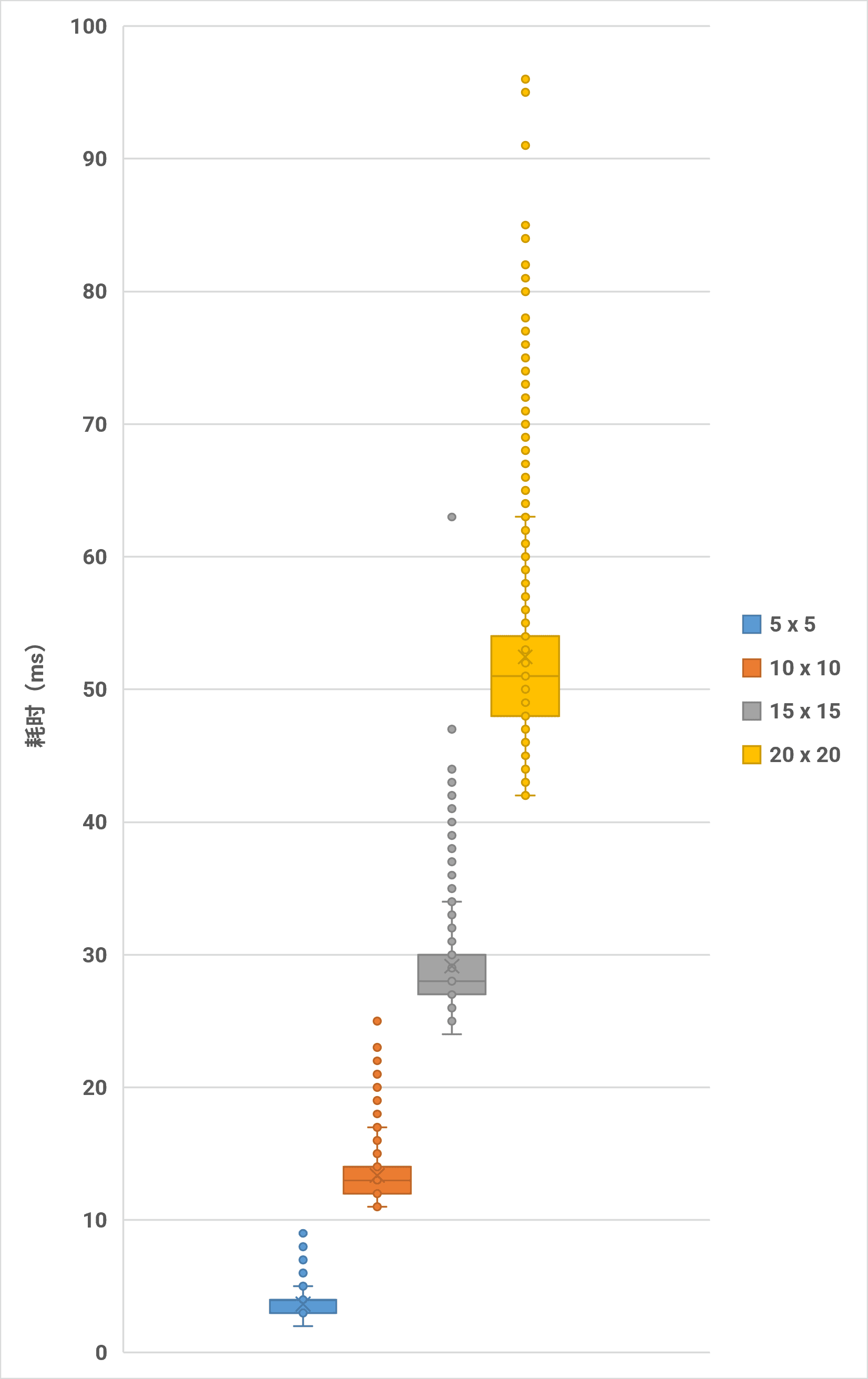
图 12:不同尺寸网格生成接水管耗时箱线图(单位:ms)
表 3:不同尺寸网格生成接水管耗时统计表
| 边长 | 5 | 10 | 15 | 20 |
|---|---|---|---|---|
| 平均值(ms) | 3.657 | 13.366 | 29.147 | 52.45 |
| 中位数(ms) | 4 | 13 | 28 | 51 |
由于 Minecraft 默认的游戏刻速率为 20,故前三者都能很好地在 1 tick 内完成。此外,平均单节点的计算耗时在 0.130 ~ 0.146 毫秒 / 格之间,现实硬件耗时的膨胀倍数与面积的膨胀倍数产生同步。
此外,针对特定大小网格在游戏过程中解题判定的耗时,本研究取了 pipes:operation/trigger/。所得结果绘制成如下所示的箱线图:
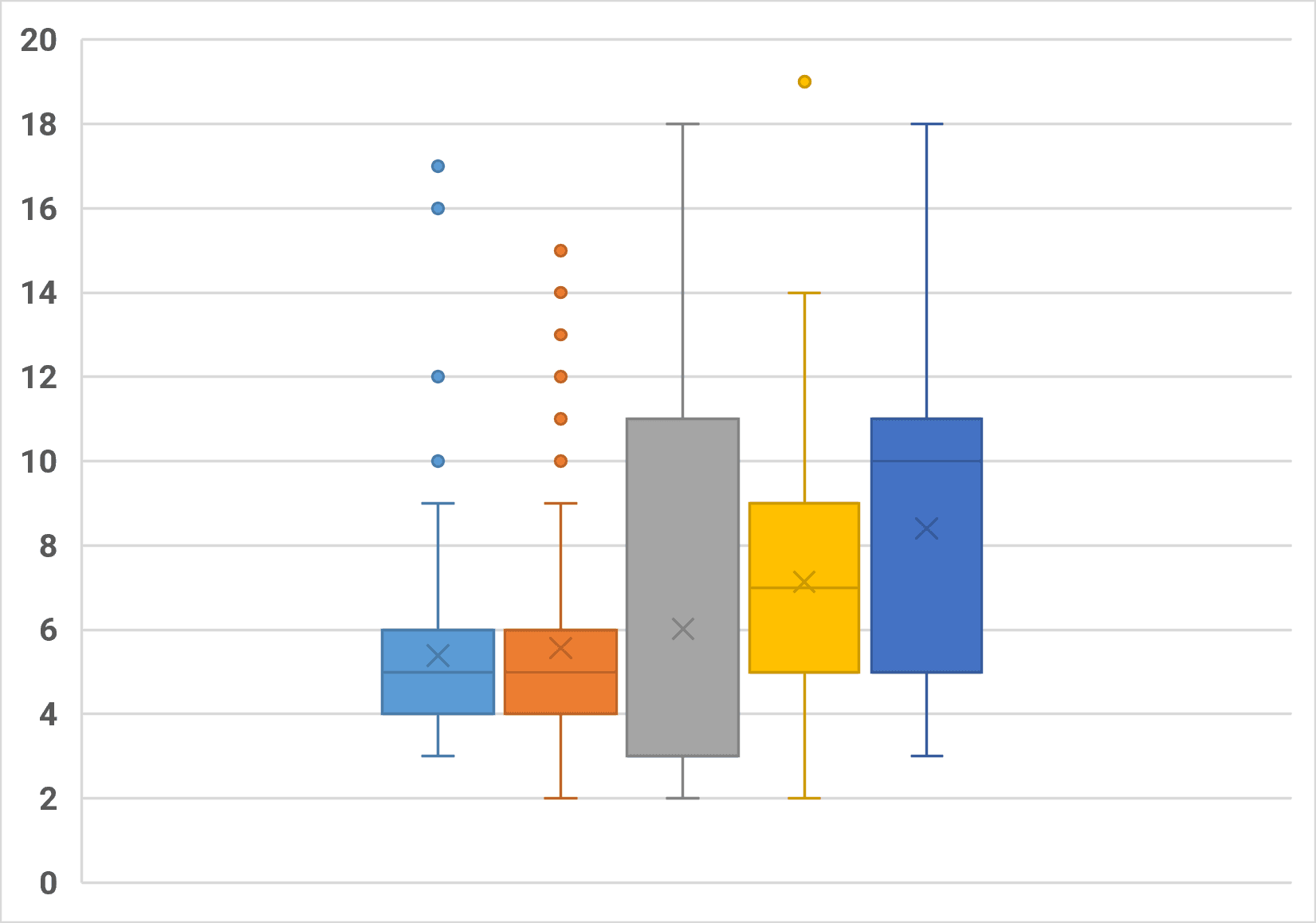
图 13:10 x 10 网格接水管解题判定耗时箱线图(单位:ms)
平均每次操作引发的解题判定耗时约为 6.64 毫秒,小于
6. 总结
本项目在 Minecraft 原版游戏环境中,成功设计并落地了一套接水管益智游戏生成与运行控制系统,其中前者基于 Prim 算法的随机树生成,后者基于 Tarjan 算法的环路搜索。
在核心模块的编写过程中,本项目坚持了“纯数据驱动”的架构设计,将网格拓扑、边集状态全面解耦存储于游戏内记分板与命令存储器中。在预先编写对应伪代码及 Python 代码的情况下,成功用原版命令还原了随机 Prim 算法和 Tarjan 算法,将最坏工况下的算法时间复杂度严格控制在
尽管本项目通过纯数据驱动确保了系统极佳的跨版本迁移性与逻辑纯净度,但面对
参考文献
[1] Meili Hegeman. Generating Pipes puzzles using maze-generating algorithms[D]. Leiden University, 2022.
[2] 七柏, 徐木弦. 命令存储进阶:使用栈管理函数上下文[J/OL]. Feature, 2026, 4(2).
[3] CR_019. 使用对话框制作2D小游戏[J/OL]. Feature, 2025, 6(1).
[4] 徐木弦. 基于按位操作及多进制编码的对话框多输入控件设计[J/OL]. Feature, 2025, 11(1).
[5] CR_019. 如何使用最新最热的MC特性制作带劲的国际象棋(上)[J/OL]. Feature, 2026, 1(2).
[6] CR_019. 如何使用最新最热的MC特性制作原版象棋(下)[J/OL]. Feature, 2026, 2(2).
[7] Dahesor. 数据包优化原则以及分析方式简述[J/OL]. Feature, 2025, 4(1).
[8] 皮革剑. 从 /stopwatch 开始: 与时间检测有关的一些胡思乱想[J/OL]. Feature, 2025, 10(1).